Table of Contents
TogglePlanning a kitchen renovation used to mean hiring a designer, waiting weeks for sketches, and hoping the final result matched what you’d imagined. Today, AI for kitchen design is flipping that process on its head. Homeowners can now walk through photorealistic renderings of their kitchen before a single cabinet is ordered, tweak materials and colors in seconds, and make confident decisions about layouts and finishes. If you’re considering a kitchen upgrade, whether it’s a modest refresh or a full remodel, AI design tools can save time, reduce costly mistakes, and bridge the gap between inspiration and reality. Let’s explore how these smart tools work and why they’re becoming indispensable for DIY renovators and homeowners in 2026.
Key Takeaways
- AI for kitchen design enables homeowners to visualize photorealistic renderings of their kitchen before any purchases or construction, reducing costly mistakes and design uncertainty.
- These intelligent tools enforce building codes, ergonomic standards, and practical spatial constraints, flagging potential issues like improper clearances or appliance conflicts early in the planning process.
- By generating multiple layout options instantly and showing materials under your kitchen’s actual lighting conditions, AI design tools eliminate weeks of designer consultations and let you iterate on color, texture, and finishes in seconds.
- AI kitchen design tools help you communicate precise specifications to contractors and suppliers—such as exact cabinet quantities and countertop materials—resulting in more accurate quotes and fewer misunderstandings during renovation.
- Start your AI kitchen design journey by measuring your space carefully, gathering design inspiration, and testing free trial versions before consulting with a professional designer to validate your AI-generated plans.
What AI Kitchen Design Tools Do
AI kitchen design tools function as intelligent drafting assistants that combine your preferences, space dimensions, and design goals into visual proposals. Unlike basic room planners, AI systems learn from thousands of kitchen designs to suggest layouts, proportions, and material combinations that actually work together. They’re trained on building codes, ergonomic standards (like the kitchen work triangle and counter depth requirements), and real-world renovation projects.
These tools typically start with your existing space. You input room dimensions, the actual measurements of your kitchen, including ceiling height, door and window placements, and any fixed elements like plumbing or electrical runs. The AI then generates multiple layout options, considering foot traffic flow, appliance placement, and storage efficiency. It can flag potential issues early: that island you’re dreaming of might block the main walkway, or your preferred refrigerator width won’t fit without relocating a wall outlet.
The software doesn’t just place boxes on a grid. It understands material properties, how granite reflects light differently than matte laminate, how cabinet depth affects walkway clearance, and how appliance size impacts workflow. Many tools integrate with product databases, so when you select a specific 36-inch refrigerator model or a 36-inch range, the AI knows its exact dimensions and can warn you if clearances violate standards.
Visualizing Your Perfect Kitchen Before You Build
Virtual 3D Rendering and Layout Planning
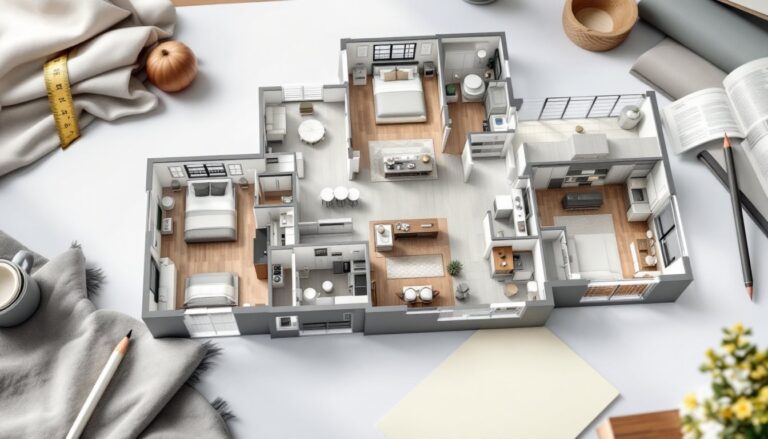
Once you’ve input your space and preferences, AI generates photorealistic 3D renderings. You’re not looking at a flat blueprint anymore, you’re seeing a walk-through visualization of your kitchen from different angles. This matters because it’s impossible to judge spatial relationships from a 2D floor plan. A 44-inch peninsula looks very different when you’re standing at the stove than it does on paper.
You can rotate the view, zoom in on cabinetry details, and even “walk” through the space to check sightlines and flow. Some platforms let you swap layouts instantly, maybe try an island layout against a galley setup, without waiting for a designer. This iteration speed is a game-changer for homeowners who work full-time and can’t attend multiple design meetings.
AI tools also enforce practical constraints. If you specify a 42-inch-wide opening for a pass-through, the software won’t suggest a 48-inch island on the other side. It works within the geometry of your actual walls, accounting for nominal lumber sizes and standard construction methods. For permitting and contractor communication, you can export plans and renderings in formats that professionals expect.
Color and Material Selection Made Easy
Choosing cabinet color, countertop material, and backtile is where most homeowners second-guess themselves. AI solves this by showing your exact cabinet model in dozens of finishes under different lighting conditions. You’re not imagining how espresso cabinets will look in your kitchen with north-facing windows and recessed lighting, you’re seeing it rendered with your actual ceiling height and appliance choices.
The software can suggest complementary color palettes based on design principles. If you pick a warm-toned countertop, it might recommend cabinet colors and backsplash tiles that balance that warmth. It pulls from large product databases, so when you select a specific tile size or countertop material, the AI knows how it pairs with other choices and flags clashing combinations.
Texture and finish matter. Matte versus glossy cabinet paint, honed versus polished granite, and the sheen level of tile all affect how the kitchen feels. AI tools that incorporate material libraries let you preview these details at scale, not as small samples at the store. This reduces the risk of ordering 40 linear feet of countertop only to discover that the finish you chose photographs in a way you dislike.
Practical Benefits for DIY Homeowners and Renovators
For DIYers tackling their own kitchen renovation, AI kitchen design tools offer several concrete advantages. First, they catch planning errors before you’re knee-deep in the work. Ordering cabinets wrong is expensive and time-consuming to correct. An AI layout confirms that your drawer-dishwasher-sink arrangement actually fits the space and doesn’t violate plumbing or electrical constraints.
Second, the tools help you communicate with professionals when you do need them. Whether you’re hiring a plumber, electrician, or general contractor, a clear 3D rendering and detailed floor plan eliminate misunderstandings. Contractors aren’t guessing what you want, they’re building what you’ve visualized and approved.
Third, you can compare project costs more accurately. When the AI specifies exact dimensions and material quantities, you can request quotes from suppliers and contractors with confidence. A rendering showing 24 linear feet of cabinetry, 36 square feet of backsplash, and 50 square feet of countertop is far more useful for budgeting than “I want to redo my kitchen.”
Finally, AI tools often include building code references, which is invaluable for DIYers. Code requirements vary by jurisdiction, reach-over distances, countertop heights, clearances for appliance doors, electrical outlet spacing, but many AI tools flag potential violations. This doesn’t replace a permit review, but it keeps you from designing something that won’t pass inspection. For structural changes or moving utilities, you’ll still need a licensed professional and a permit, but at least you know where the red flags are before you call the inspector.
Getting Started With AI Kitchen Design Tools
Starting with an AI kitchen design tool is straightforward, though preparation makes the process faster and more accurate. Begin by measuring your kitchen carefully. You need the dimensions of all walls, ceiling height, door swing direction, and the exact location of windows. Mark any fixed elements, electrical outlets, light switches, plumbing stubs, and gas lines. Accuracy here matters: measure twice and note whether your walls are square (hint: many older homes aren’t).
Next, gather inspiration. Browse existing design resources, The Kitchn and Remodelista publish kitchen projects regularly, and note styles, color schemes, and layouts you’re drawn to. Screenshot or pin images to a folder so you can describe your vision to the AI and, later, to contractors.
Many AI platforms, like AI tools available on Houzz, offer free trials or freemium versions. Start there to get a feel for the workflow. Input your room dimensions, browse design options, and explore how changing a single variable (cabinet depth, island size, appliance placement) affects the overall layout.
When you’ve narrowed your vision, consider hiring a kitchen designer for a consultation, not a full design, but a 1-2 hour session to validate your AI-generated plans. Designers catch things software sometimes misses, like lighting distribution, ventilation conflicts, or how traffic flows in practice. Then move forward with your refined plan, either executing the work yourself or handing the renderings and floor plans to a contractor. Many homeowners find that involving a contractor early, before committing to detailed design choices, saves money on changes later.
Conclusion
AI for kitchen design isn’t magic, but it does eliminate the guesswork from one of the most complex home projects. By visualizing your kitchen before spending money, you make smarter decisions about layout, materials, and budget. Whether you’re a full DIY warrior or hiring professionals, these tools give you confidence and clarity. The technology keeps improving, making it easier to design a kitchen that actually works for how your household lives.